Spring AI(1)- Chat Client With OpenAI and Gemini
目录
背景#
决定入手Spring AI。有几个原因:
- 今年已经看了2本关于 AI 的书籍,AI-Assisted Coding和How Large Language Models Work,具备了一定的理论基础。
- 这个月看今年的 Spring IO 大会的相关视频,里面有Dan Dobrin对Spring AI 的介绍,感觉 Spring AI 的可玩度应该是蛮高的了。
- Dan Vega将自己的整个博客网站的内容使用 Spring AI 做了一个MCP 服务,interesting!
Spring AI 项目生成#
一样的,使用spring initializr生成项目骨架。
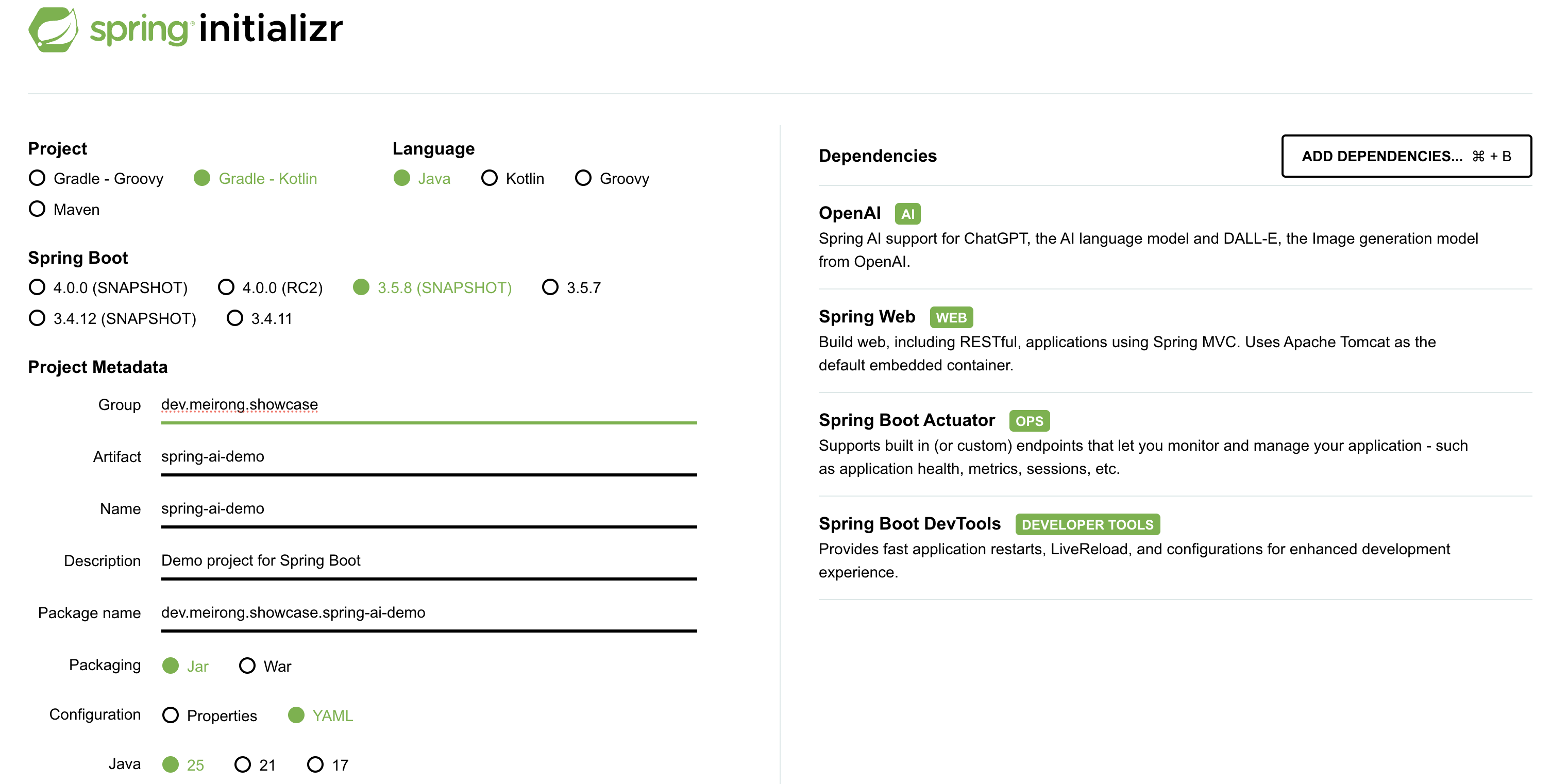
- 和普通的 Spring Boot 的 web 项目一样,选择 Spring Web 依赖即可。
- 为了开发调试,选择 Spring Boot DevTools 依赖。
- 为了方便问题排查,选择 Spring Boot Actuator 依赖。
- 选择 Java 25版本 + Gradle。
项目#
七节顺着把这个 demo 跑起来:功能、代码、配置、运行,然后是它为什么能靠 OpenAI 兼容接口直接换到 Gemini,最后是测试。
功能#
实现一个简单的 QA 对话,用户输入一个问题,调用 OpenAI 的 API 获取回答并返回给用户。
官方文档Chat Client API
代码实现#
接口定义
public interface BoardGameService {
    Answer askQuestion(Question question);
}

public record Answer(String answer) {
}

public record Question(String question) {
}
实现类
@Service
public class SpringAiBoardGameService implements BoardGameService {

    private final ChatClient chatClient;

    public SpringAiBoardGameService(ChatClient.Builder chatClientBuilder) {
        this.chatClient = chatClientBuilder.build();
    }

    @Override
    public Answer askQuestion(Question question) {
        var answerText = chatClient.prompt()
        .user(question.question())
        .call()
        .content();
        return new Answer(answerText);
    }
}
web 层
@Controller
public class AskController {
    private final BoardGameService boardGameService;

    public AskController(BoardGameService boardGameService) {
        this.boardGameService = boardGameService;
    }

    @PostMapping(path = "/ask", produces = "application/json")
    public Answer ask(@RequestBody Question question) {
        return boardGameService.askQuestion(question);
    }
}
配置#
application.yaml配置文件内容如下:
spring:
  application:
    name: spring-ai-demo
  ai:
    openai:
      api-key: ${OPENAI_API_KEY}
      base-url: https://api.openai.com

management:
  endpoints:
    web:
      exposure:
        include: "*"
运行#
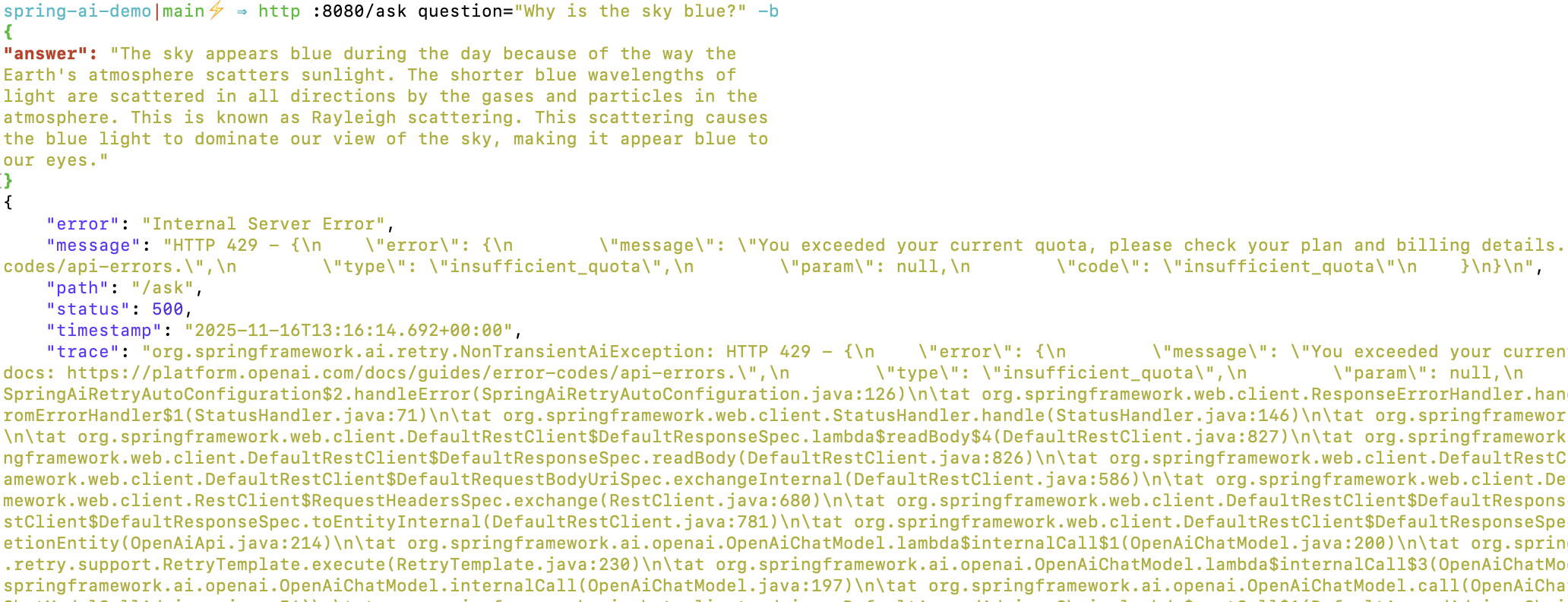
OpenAI 的 API key 需要付费账户才能使用。免费账户就算生成了 API key 也是无法调用的。会报429 Too Many Requests错误。
OpenAI API 兼容性#
Spring AI 支持多种 AI 模型提供商。虽然不同的提供商有各自不同的私有 API,但是很多提供商都实现了 OpenAI API 的兼容接口。某种程度来说,大家都在 copy OpenAI 的 API 设计,目前 OpenAI 的 API 设计已经成为事实上的标准。
切换到 Gemini#
将application.yaml中的配置修改为:
spring:
  application:
    name: spring-ai-demo
  ai:
    # openai:
    #   api-key: your openai-api-key
    #   base-url: https://api.openai.com
    google:
      genai:
        api-key: ${GOOGLE_GENAI_API_KEY}

management:
  endpoints:
    web:
      exposure:
        include: "*"
然后将环境变量GOOGLE_GENAI_API_KEY设置为你的 Gemini API key 即可。
可以到Google AI Studio创建 API key。
依赖实现也需要切换
--implementation("org.springframework.ai:spring-ai-starter-model-openai")
++implementation("org.springframework.ai:spring-ai-starter-model-google-genai")
org.springframework.ai.chat.client.ChatClient会自动切换到 Google Gemini 的实现。
测试#
http :8080/ask question="What's the weather in singapore today?"
HTTP/1.1 200
Connection: keep-alive
Content-Type: application/json
Date: Sun, 16 Nov 2025 15:37:29 GMT
Keep-Alive: timeout=60
Transfer-Encoding: chunked

{
    "answer": "I do not have access to real-time weather information. To find out the weather in Singapore today, I recommend checking a reliable weather source such as:\n\n*   **Google Weather:** Simply search \"weather in Singapore\" on Google.\n*   **National Environment Agency (NEA) Singapore:** Their website ([nea.gov.sg](https://www.nea.gov.sg/)) provides detailed weather forecasts and information.\n*   **AccuWeather:** ([accuweather.com](https://www.accuweather.com/))\n*   **The Weather Channel:** ([weather.com](https://weather.com/))\n\nThese sources will give you the most up-to-date and accurate weather information for Singapore.\n"
}
总结#
Spring AI 提供了一个非常方便的方式来集成各种 AI 模型服务。通过统一的 API 接口,可以轻松切换不同的 AI 提供商,降低了集成的复杂度。
上面的例子通过切换配置,实现了从 OpenAI 到 Google Gemini 的无缝切换,展示了 Spring AI 的强大功能和灵活性。如果本地搭建了Ollama等支持 OpenAI API 的服务,也可以通过类似的方式进行集成。